
If this is just what you need for your small office to help bring more income order here. Read on if you need more details to see how this great product can work for you.
It is easy to use Viva la Office! It run in Windows 3.1 with any ‘blaster’ type sound card. Viva la Office! runs in the background using a few percent of the CPU’s time, multitasking with other Windows applications you are using. You define the Viva la Office! operation with simple controls and complete set of included office sounds. You can easily add custom sounds for your special needs. The Viva la Office! ambiance can be simple for a quiet environment or complex to produce a really hectic activity.
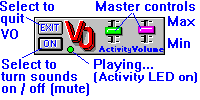
 VO Ambiance - You can create any sound ambiance with the 10 track pseudo-random generator. Lets a one-person office sound like a big operation. Use the sounds to mask uncontrollable sounds like street, construction sounds or even kids playing in the next room. The 10 track pseudo-random generator efficiently produces sound ambiances without the canned or repeating characteristics of single track linear recordings. This creates truly natural, random office activity sounds. Volume and activity are under instant foreground control with slider controls.
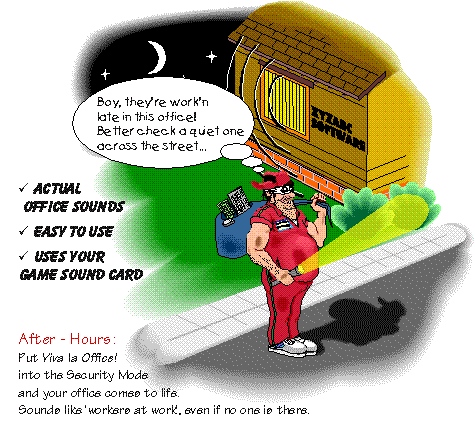
Fool the badguys! (31 K GIF)
The Security Mode gives your office a ‘workers at work’ sound. Makes it seem as if the office is occupied. This is not like having a radio playing. Use your own recorded voices to customize the ‘activity.’
 VO Excuse Buttons - A set of sounds, playable on instant command, to help get you off the phone. The included set of sounds is:
 VO Company Doctor - Reminds you to take breaks from ‘stressful’ computer use to prevent fatigue. The Doctor monitors your computer use and stressful activity. At time intervals you define, the Doctor signals you to get away from the computer and stretch or exercise. Select a simple visual signal or voiced reminder. Use your own recorded sounds too.
The Doctor also monitors your computer’s critical system resources and warns of a pending Windows crash. Lets you quit those applications that are not critical and save any important data.
VO Company Doctor
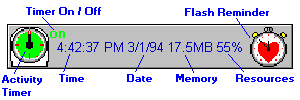
Start VO Doctor by selecting the VO Doctor icon. The program pop-up will appear after a few seconds in the default screen position. Use your computer as you would normally. After a few minutes of keyboard or mouse use, you will see the Activity Timer dial rotate (on the left side of the larger pop-up).
After 12 minutes (default setting) of normal keyboard and or mouse use the Timer will trip. Then the Reminder to "take a break" will play or flash. Open the settings dialog box to change the pop-up size, fonts, colors, etc.
VO Excuse Buttons
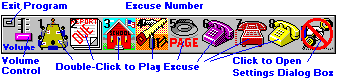
Start VO Excuses by selecting the VO Excuses icon. Double-click one of the Excuse Buttons (icons in the pop-up body) and the sound for that Button will play. Open the settings dialog box to change excuses.
Yes, this sounds like something I could use. How do I order?
Go to: Home & Office Selections | Data Acquisition Products | Technical Services |
Virtual Company | Company Profile | Chocolate Mint | SiliconSoft Home | Page Top
© Copyright 1997 SiliconSoft, Inc. All rights reserved. Viva la Office!, VO Ambiance, VO Company Doctor, VO Excuse Buttons, and SiliconSoft are trademarks of SiliconSoft®, Inc.